A
2

Epic
The Epic EMR interface efficiently manages patient data and workflows, simplifying care coordination and documentation in healthcare settings.
What is the product?
Epic EMR (Electronic Medical Record) is a comprehensive software system designed for healthcare organizations to manage patient records, workflows, and medical information electronically.
What is Epic’s support feature?
Epic’s support feature is an AI "Quick Assistance" chatbot integrated directly within the platform.
This chatbot would provide on-demand support to healthcare professionals navigating the Epic system, offering real-time guidance, troubleshooting assistance, and answers to common queries.
The chatbot could also proactively suggest relevant resources, such as help articles or training materials, based on the user's context within the EMR.
By offering immediate support within the workflow, this feature would enhance user proficiency, reduce frustration, and ultimately optimize the utilization of the Epic EMR system.
Epic's expanding patient data repository poses challenges in locating specific details, resulting in heightened user stress and decreased accessibility.
The Problem
The Solution
Implement an AI support tool to aid users in navigating Epic's extensive patient data, enabling healthcare workers to optimize workflow and enhance patient care.

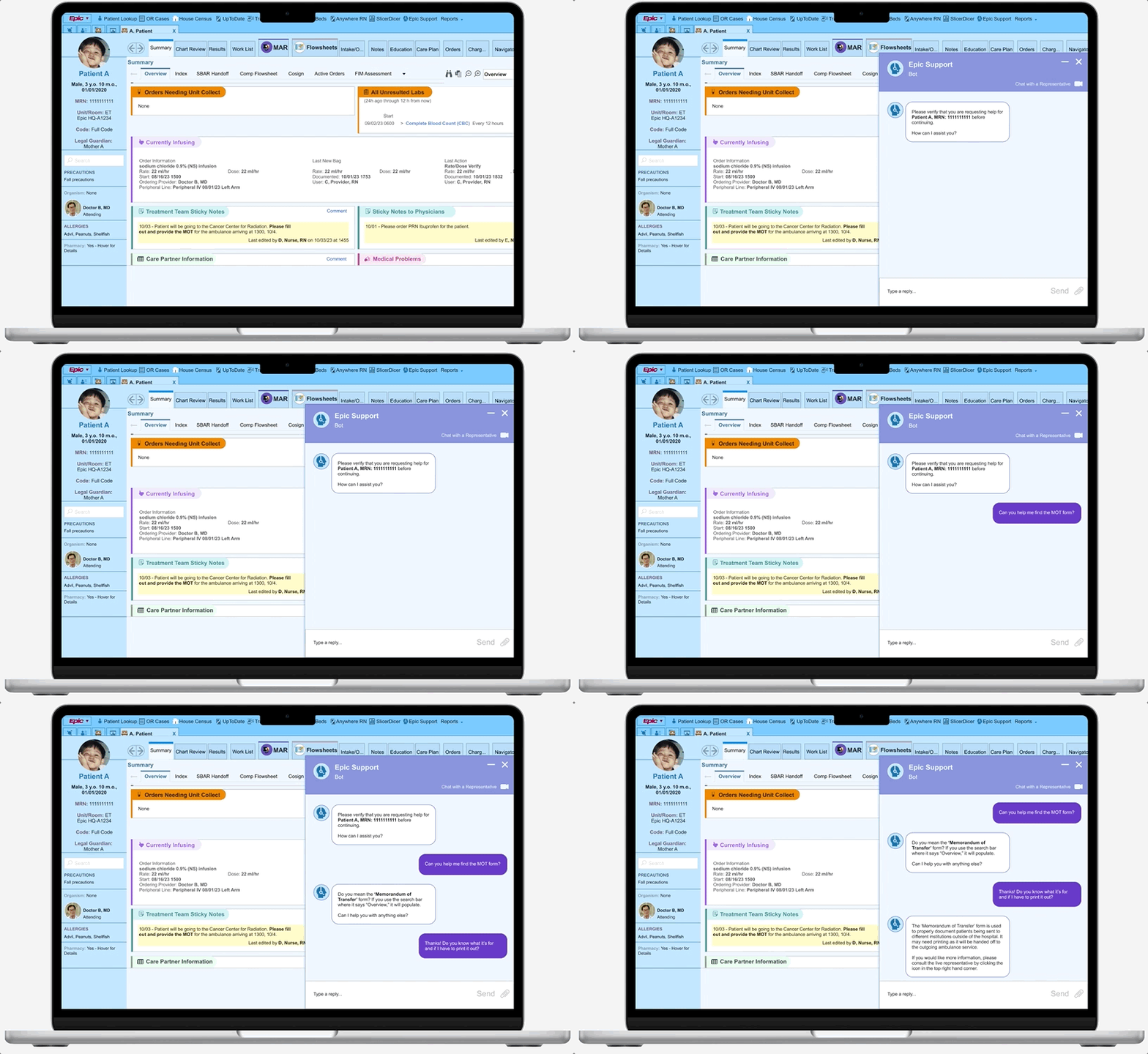
Accessible AI Chatbot Feature
- Patient Verification at activation promotes HIPAA (Health Insurance Portability and Accountability Act) ethics and prevents patient errors
- UI follows suit with conventional chat windows to minimize user learning curves
- Ability to minimize or maximize interface to fit user needs

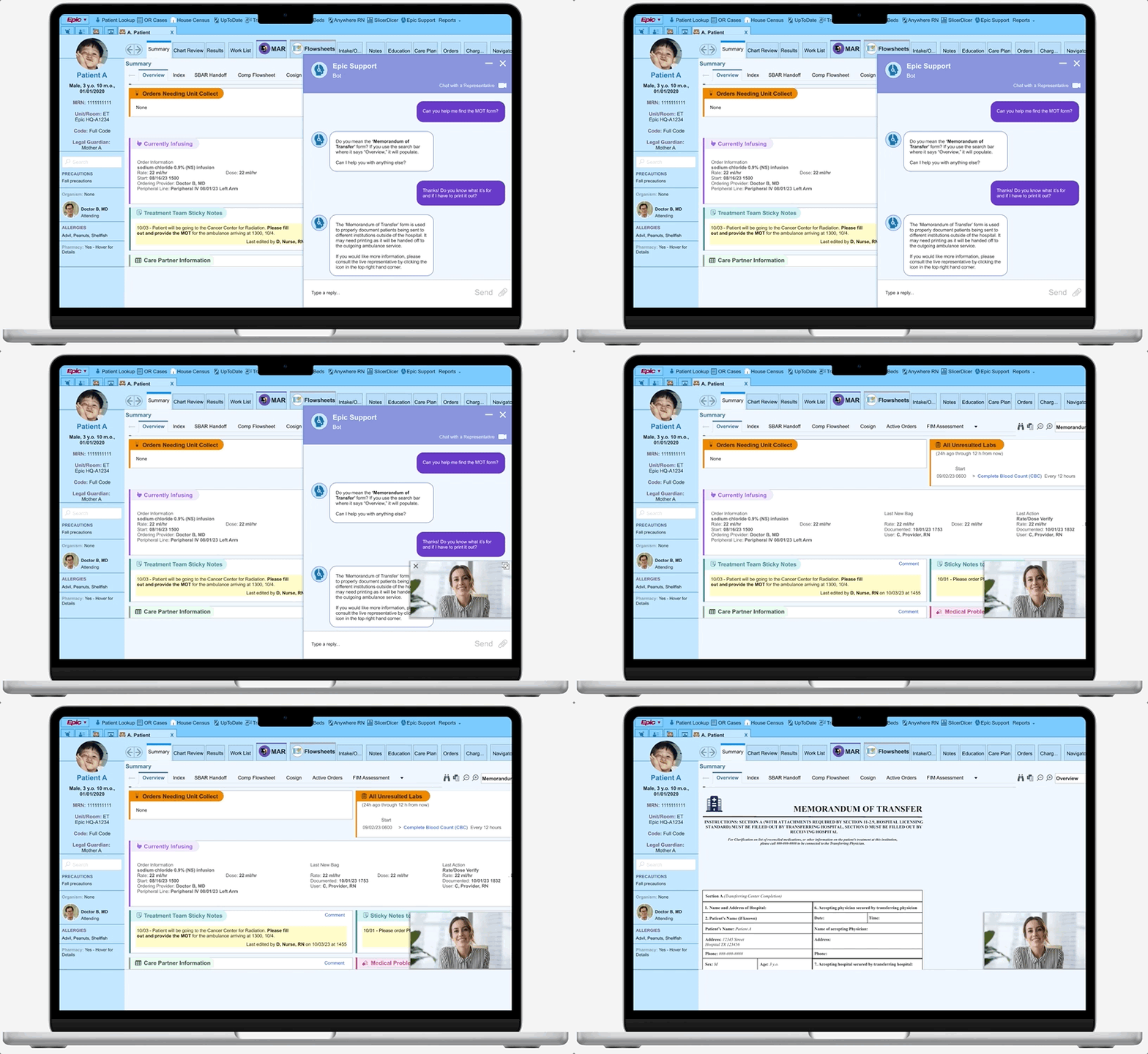
Escalate to a Live Representative
- Adds extra user support to give viability to product help options
- Able to speak via video and text to fit hospital and HIPAA policies
View Final Prototype
Research Phase
What steps did I take to arrive at this solution?
Competitive Analysis
Existing EMRs continue to face the challenge of maximizing presented data points and minimizing product learning curves, which occasionally causes user stress and error.
I conducted a competitive analysis to further understand the relationship between various electronic healthcare medical records and user/clinician satisfaction. My research frequently indicated usability issues, and a slow ability to implement product updates due to the amount of resources needed to manage data.

Epic
Efficient inter-operability
High initial & maintenance costs
Popular EMR

“Cerner Millennium” synchs third party products
Features have high learning curve
Cerner

Integration with pharmaceutical products
Slower than competitors in updating features
Allscripts


Newly implemented “AI Virtual Assistant”
Common inter-
operability challenges & training needs
Meditech
User Interviews & Insights
Coming away from the twelve user interviews I conducted, I compiled the gathered data into two major themes: Clarity & Utility.
The First Theme: Clarity
Users will search for clear and concise information to decrease cognitive workload, and streamline their flow.
“Epic does a good job showing lab results because it includes resources for reference ranges and is organized by lab classification {making it easier to skim through}.”

Clinical Pharmacist
Users stress this value heavily, citing it as an overarching rationale when asked how Epic can be directly improved.
The amount of friction induced by task flows (both familiar and unfamiliar) directly affects the quality of satisfaction healthcare professionals have with their jobs.
“In psychiatry, many of our notes should be censored from patients, but this option has to be done manually by clicking a heart in the upper right-hand corner of the note and selecting a reason for censorship. I wish this would pop up automatically when we create the psychiatry consult/progress note, so that we do not forget to censor it.”


Medical Resident
“It can be quick and easy to find a patient if I use the system lists and the Medical Record Numbers that I’m used to.”


Inpatient Secretary
Users often found Epic (or other EMRs) easy to use when completing flows that are common in their daily tasks.
When it came to new task flows, especially with those that did not have clear indicators, they would often look outside of the product for quick solutions (e.g. coworkers, superiors, etc).
The Second Theme: Utility
Users want simple resources and concise responses to help them rectify the issues they encounter.
Users are open to the idea of a new chatbot helping them. However, first impressions are essential here; Users asking for help are often in a state of vulnerability.
Utilizing an available chatbot that is unable to help when used, elicits a visceral, overly negative opinion from the user. The inverse is true as well.
“I don’t like it when AI support continues to try to help me at length, even when I know that my inquiry is likely too specific to be resolved with AI (or if it doesn’t give me the option to opt-out).”

Registered Nurse

Registered Nurse
“I tried to reschedule an appointment for car maintenance and the chatbot couldn’t help me at all…. I had to call to reschedule, so now I try not to use them.”

Physical Therapist
“The chatbot helped me to switch to a subscription with smaller toys {for my dog}. {Now} I look for a chatbot on every single site I use.”
If there were a sliding scale that indicated how willingly users would utilize a chatbot or how much trust they would put into it in the future, the product’s inability to help after users wasted energy would lower its position on said scale.
Still, users will often look outside themselves for help if they can’t quickly figure out a problem.


Nurse Manager
“Oh, maybe Epic should have a function for contacting their Help desk? I’ve never used it, but if it is there. I’d probably use it.”


Attending Doctor
“I would usually call someone, like pathology or imaging, if I can’t find any needed patient results posted online.”
From User Input -> Empathic, Empirical Data
Personas
Synthesizing the interview data, I created two personas representing groups of individuals who often run into trouble utilizing Epic during work hours. Although their scenarios may differ, many of their core needs remain similar, and thus, the personas should be focused on serving a larger population of clinicians and healthcare-adjacent workers.
Consider the persona scenario below:
Yvonne

Yvonne is a newly graduated registered nurse working at an endocrine inpatient floor in a children’s hospital.
She is asked to provide the MoT (Memorandum of Transfer) form for her off-service cancer patient undergoing radiation at a different institution.
Yvonne and her coworker need to learn how to find the MoT form, and are pressed for time.
With an AI support feature, or with the help of a live representative, Yvonne could ensure her patients makes their important appointments, and reduce the cognitive workload needed to solve the problem.
The question at hand...
How might we create a support feature that is easy to use, reliable, and helps to decrease the stress load within user flows?
Ideation Phase
How did I turn this data into serviceable actions?
Prioritization
Given that a numerous resources are utilized to manage system updates to Epic’s EMR product, I decided to work on the essentials of the support feature that would be less likely to hinder the engineering and maintenance of the product. Although some nice add-ons would work well for the chatbot, they may affect the amount of resources needed for a first rollout.
Must Have
Must Have
- Clickable Icon
- Message Box
- Epic AI
- Live Support
Nice to Have
- Onboarding Tutorial Tool
- Onboarding Icon
Surprising
- AI Mascot
Comes Later
- Task Specific AI
Task Flows
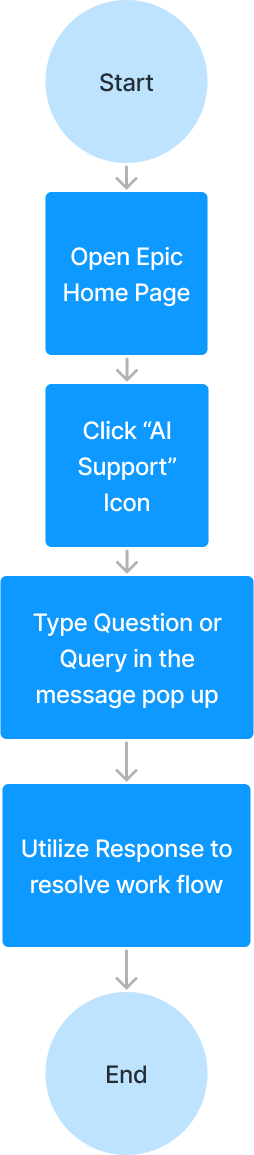
With a focus on AI chat essentials, I decided to create two connected task flows that should be utilized to solve issues that arise during Epic usage.
Straightforward task flows will help users feel control in their search for task clarity. While each resolution method provided is a different means, the general steps taken to fix user issues are congruent.
The following methods should comfort the user in its ease of operation.
Support Resource - AI Chat
Support Resource - Live Representative
Design Phase
How did I organize the structure and create the features?
- Icon to be implemented into the primary toolbar for instant availability
- Recognizable support icon, so user eyes can scan and easily recognize
Fast and organized method of accessing the support tool
Low to Mid Fidelity Wireframes
I considered several criteria when working through low and mid-fidelity; Below are the needs I addressed when consolidating all the collected information into physical designs.
User Need
User Need
Familiar UI to lower the learning curve when using the support tool
User Need
Ability to quickly escalate to a live representative to ensure assistance
Applied Design
Applied Design
- Similar layout to popular desktop messengers with a rectangular, card layout
- Flow that allows fast back and forth, with indicated user avatars
Applied Design
- Addition of a discernible button to immediately switch to representative feed
- Toolbar to help provide resources during interaction
The Central Feature: AI Support Flow
The integration of the support AI should appear seamless into the current Epic interface. My initial idea is to place it into the primary navigation bar, and update it as necessary if the placement experiences friction or delays access times during user testing.
As evidenced by the prior research interviews, users usually reach out for help during times of duress. To assist users as optimally as possible, the UI must be approachable and straightforward.


Patient Information
Provider Information + Precautions
Navigation Bar
Support Icon
Tabs
Sub Tabs
Search
Misc Information
Misc Information
Misc Information
Misc Information
Misc Information
Misc Information
Misc Information


Patient Information
Provider Information + Precautions
Navigation Bar
Support Icon
Tabs
Sub Tabs
Search
Misc Information
Misc Information
Misc Information
Misc Information
Misc Information
Misc Information
Misc Information

How can I assist you?
Use this link/icon to speak to a live representative
Type Text Here
Support
Patient Information
Provider Information + Precautions
Navigation Bar
Support Icon
Tabs
Sub Tabs
Search
Misc Information
Misc Information
Misc Information
Misc Information
Misc Information
Misc Information
Misc Information
How can I assist you?
Use this link/icon to speak to a live representative
Type Text Here
Support
Additional Features: Access to a Live Representative
I decided for the live rep UI to appear as a small screen, so that the user may click and navigate to the other features of the Epic interface while getting guidance on their problems.
A toolbar would ideally be featured below, with the ability to send screen captures or attach files that might help to end the query quickly.


Patient Information
Provider Information + Precautions
Navigation Bar
Support Icon
Tabs
Sub Tabs
Search
Misc Information
Misc Information
Misc Information
Misc Information
Misc Information
Misc Information
Misc Information

Support Representative
Navigation Bar
High Fidelity Wireframes
User testing initiated several changes during the hi-fi creation.
- Patient Identification is confirmed in the support chat prior to query continuation.
During low-fidelity testing, a user mentioned that the scenario’s glaring issue was the chatbot’s negligence in double-checking ID.
Doing so will allow the feature to protect patient care and safety further, and ensure compliance with HIPAA laws.
The hi-fi frames were created to fully mimic Epic’s entire graphic interface with the support icon and text button added to the central, top navigation bar.
The additional usage of text next to the chosen “person with a headset” icon should ultimately help the user find support as quickly as they may need to.
The initial choice of the support AI colors and fonts mean to mimic Epic’s current aesthetic choices and create further, seamless cohesion.
The slightly darker hues of blue should help to slightly differentiate the box as part of the screen’s forefront when in use.


Patient Lookup

OR Cases

House Census


UpToDate
Transfer Center

Staffed Beds

Anywhere RN
SlicerDicer

Epic Support
Reports


PROVIDER B.

Epic


A, Patient
X


Male, 3 y.o. 10 m.o.,
01/01/2020
MRN: 1111111111
Unit/Room: ET
Epic HQ-A1234
Code: Full Code
Legal Guardian:
Mother A
Patient A

Search
PRECAUTIONS
Fall precautions
Organism: None

Doctor B, MD
Attending
ALLERGIES
Advil, Peanuts, Shellfish
Pharmacy: Yes - Hover for Details

Summary
Chart Review
Results
Work List

MAR

Flowsheets
Intake/O...
Notes
Education
Care Plan
Orders
Charg...
Navigators
DC Info

Summary

Overview


Index
SBAR Handoff
Comp Flowsheet
Cosign
Active Orders
FIM Assessment


Overview


None

Orders Needing Unit Collect


All Unresulted Labs

(24h ago through 12 h from now)
Start
09/02/23 0600 > Complete Blood Count (CBC) Every 12 hours 08/29/23 1643
Ordered
Comment | Expand | Hide
Currently Infusing


Order Information
sodium chloride 0.9% (NS) infusion
Rate: 22 ml/hr Dose: 22 ml/hr
Start: 08/16/23 1500
Ordering Provider: Doctor B, MD
Peripheral Line: Peripheral IV 08/01/23 Left Arm
Last New Bag
Rate: 22 ml/hr Dose: 22 ml/hr
Documented: 10/01/23 1753
User: C, Provider, RN
Last Action
Rate/Dose Verify
Rate: 22 ml/hr . Dose: 22 ml/hr
Documented: 10/01/23 1832
User: C, Provider, RN
[Open MAR]
Treatment Team Sticky Notes

10/03 - Patient will be going to the Cancer Center for Radiation. Please fill out and provide the MOT for the ambulance arriving at 1300, 10/4.
Last edited by D, Nurse, RN on 10/03/23 at 1455
Comment
Sticky Notes to Physicians

10/01 - Please order PRN Ibuprofen for the patient.
Last edited by E, Nurse, RN on 09/31/23 at 1455
Comment


Care Partner Information
Comment


Medical Problems
Comment
- Epic icon is located in the topmost navigation bar, with an icon color congruent to the other blue icons in on the same screen.


Patient Lookup

OR Cases

House Census


UpToDate
Transfer Center

Staffed Beds

Anywhere RN
SlicerDicer

Epic Support
Reports


PROVIDER B.

Epic


A, Patient
X


Male, 3 y.o. 10 m.o.,
01/01/2020
MRN: 1111111111
Unit/Room: ET
Epic HQ-A1234
Code: Full Code
Legal Guardian:
Mother A
Patient A

Search
PRECAUTIONS
Fall precautions
Organism: None

Doctor B, MD
Attending
ALLERGIES
Advil, Peanuts, Shellfish
Pharmacy: Yes - Hover for Details

Summary
Chart Review
Results
Work List

MAR

Flowsheets
Intake/O...
Notes
Education
Care Plan
Orders
Charg...
Navigators
DC Info

Summary

Overview


Index
SBAR Handoff
Comp Flowsheet
Cosign
Active Orders
FIM Assessment


Overview


None

Orders Needing Unit Collect


All Unresulted Labs

(24h ago through 12 h from now)
Start
09/02/23 0600 > Complete Blood Count (CBC) Every 12 hours 08/29/23 1643
Ordered
Comment | Expand | Hide
Currently Infusing


Order Information
sodium chloride 0.9% (NS) infusion
Rate: 22 ml/hr Dose: 22 ml/hr
Start: 08/16/23 1500
Ordering Provider: Doctor B, MD
Peripheral Line: Peripheral IV 08/01/23 Left Arm
Last New Bag
Rate: 22 ml/hr Dose: 22 ml/hr
Documented: 10/01/23 1753
User: C, Provider, RN
Last Action
Rate/Dose Verify
Rate: 22 ml/hr . Dose: 22 ml/hr
Docume3 1832
User: C, Provider, RN
[Open MAR]
Treatment Team Sticky Notes

10/03 - Patient will be going to the Cancer Center for Radiation. Please fill out and provide the MOT for the ambulance arriving at 1300, 10/4.
Last edited by D, Nurse, RN on 10/03/23 at 1455
Comment
Sticky Notes to Physicians

10/01 - Please order PRN Ibuprofen for the patient.
Last edited by E, Nurse, RN on 09/31/23 at 1455
Comment


Care Partner Information
Comment


Medical Problems
Comment
Epic Support
Bot

Minimize


Exit

Please verify that you are requesting help for Patient A, MRN: 1111111111 before continuing.
How can I assist you?
Type a reply...

Can you help me find the MOT form?

Do you mean the ‘Memorandum of Transfer’ form? If you use the search bar where it says “Overview,” it will populate.
Can I help you with anything else?
Thanks! Do you know what it’s for and if I have to print it out?
- Support chat is located on the right most side, as to keep patient information visible on the left.
- Minimize button located in the top right in order to hide the chatbot and access the interface hidden under it.
- Stroke added to add dimension and separate the chat box from the rest of the interface.
- Same background blue hue chosen for the chat display to convey visual harmony.


Patient Lookup

OR Cases

House Census


UpToDate
Transfer Center

Staffed Beds

Anywhere RN
SlicerDicer

Epic Support
Reports


PROVIDER B.

Epic


A, Patient
X


Male, 3 y.o. 10 m.o.,
01/01/2020
MRN: 1111111111
Unit/Room: ET
Epic HQ-A1234
Code: Full Code
Legal Guardian:
Mother A
Patient A

Search
PRECAUTIONS
Fall precautions
Organism: None

Doctor B, MD
Attending
ALLERGIES
Advil, Peanuts, Shellfish
Pharmacy: Yes - Hover for Details

Summary
Chart Review
Results
Work List

MAR

Flowsheets
Intake/O...
Notes
Education
Care Plan
Orders
Charg...
Navigators
DC Info

Summary

Overview


Index
SBAR Handoff
Comp Flowsheet
Cosign
Active Orders
FIM Assessment


Overview


None

Orders Needing Unit Collect


All Unresulted Labs

(24h ago through 12 h from now)
Start
09/02/23 0600 > Complete Blood Count (CBC) Every 12 hours 08/29/23 1643
Ordered
Comment | Expand | Hide
Currently Infusing


Order Information
sodium chloride 0.9% (NS) infusion
Rate: 22 ml/hr Dose: 22 ml/hr
Start: 08/16/23 1500
Ordering Provider: Doctor B, MD
Peripheral Line: Peripheral IV 08/01/23 Left Arm
Last New Bag
Rate: 22 ml/hr Dose: 22 ml/hr
Documented: 10/01/23 1753
User: C, Provider, RN
Last Action
Rate/Dose Verify
Rate: 22 ml/hr . Dose: 22 ml/hr
Docume3 1832
User: C, Provider, RN
[Open MAR]
Treatment Team Sticky Notes

10/03 - Patient will be going to the Cancer Center for Radiation. Please fill out and provide the MOT for the ambulance arriving at 1300, 10/4.
Last edited by D, Nurse, RN on 10/03/23 at 1455
Comment
Sticky Notes to Physicians

10/01 - Please order PRN Ibuprofen for the patient.
Last edited by E, Nurse, RN on 09/31/23 at 1455
Comment


Care Partner Information
Comment


Medical Problems
Comment
Erin
Live Representative

Minimize


Exit



- Initial interface for the live representative video feed is laid out similarly to the chat window, but will likely need further iterating to optimize the layout.
Hi Fi V1 to V2
After meeting with my mentor, several changes to the frames were made to further improve usability and accessibility for the user.
The changes made include:
- The collapse/close text was removed from the support chat to simplify the chat header.
- A video chat icon was added to the header to be closer to the other options.
- The ability to upload a file was added with the recognizable “staple” icon.
- To further separate the chat window from the rest of the interface, purple replaced blue as the primary color. A drop shadow of 4 was also added to the stroke outline.
- The video chat feed with the live representative was shrunk in size to allow for continued access to the chat dialogue.


Patient Lookup
OR Cases

House Census
UpToDate
Transfer Center

Staffed Beds

Anywhere RN
SlicerDicer
Epic Support
Reports


PROVIDER B.
Epic


A, Patient
X


Male, 3 y.o. 10 m.o.,
01/01/2020
MRN: 1111111111
Unit/Room: ET
Epic HQ-A1234
Code: Full Code
Legal Guardian:
Mother A
Patient A
Search
PRECAUTIONS
Fall precautions
Organism: None

Doctor B, MD
Attending
ALLERGIES
Advil, Peanuts, Shellfish
Pharmacy: Yes - Hover for Details

Summary
Chart Review
Results
Work List

MAR

Flowsheets
Intake/O...
Notes
Education
Care Plan
Orders
Charg...
Navigators
DC Info

Summary

Overview

Index
SBAR Handoff
Comp Flowsheet
Cosign
Active Orders
FIM Assessment


Overview


None
Orders Needing Unit Collect


All Unresulted Labs

(24h ago through 12 h from now)
Start
09/02/23 0600 > Complete Blood Count (CBC) Every 12 hours 08/29/23 1643
Ordered
Comment | Expand | Hide
Currently Infusing

Order Information
sodium chloride 0.9% (NS) infusion
Rate: 22 ml/hr Dose: 22 ml/hr
Start: 08/16/23 1500
Ordering Provider: Doctor B, MD
Peripheral Line: Peripheral IV 08/01/23 Left Arm
Last New Bag
Rate: 22 ml/hr Dose: 22 ml/hr
Documented: 10/01/23 1753
User: C, Provider, RN
Last Action
Rate/Dose Verify
Rate: 22 ml/hr . Dose: 22 ml/hr
Docume3 1832
User: C, Provider, RN
[Open MAR]
Treatment Team Sticky Notes

10/03 - Patient will be going to the Cancer Center for Radiation. Please fill out and provide the MOT for the ambulance arriving at 1300, 10/4.
Last edited by D, Nurse, RN on 10/03/23 at 1455
Comment
Sticky Notes to Physicians

10/01 - Please order PRN Ibuprofen for the patient.
Last edited by E, Nurse, RN on 09/31/23 at 1455
Comment


Care Partner Information
Comment


Medical Problems
Comment
Epic Support
Bot
Chat with a Representative


Can you help me find the MOT form?
Type a reply...
Send


Do you mean the ‘Memorandum of Transfer’ form? If you use the search bar where it says “Overview,” it will populate.
Can I help you with anything else?
Thanks! Do you know what it’s for and if I have to print it out?

The ‘Memorandum of Transfer’ form is used to properly document patients being sent to different institutions outside of the hospital. It may need printing as it will be handed off to the outgoing ambulance service.
If you would like more information, please consult the live representative by clicking the icon in the top right hand corner.


- Switched to flat UI for cohesion.
- Text added to icons, as the icon’s function is more specific than simple action (i.e. minimize or close).
- Live feed also has its own close/minimize icons in the video feed in order to intuit icon purpose and keep other parts of the interface from getting cluttered.


Patient Lookup

OR Cases

House Census


UpToDate
Transfer Center

Staffed Beds

Anywhere RN
SlicerDicer

Epic Support
Reports


PROVIDER B.

Epic


A, Patient
X


Male, 3 y.o. 10 m.o.,
01/01/2020
MRN: 1111111111
Unit/Room: ET
Epic HQ-A1234
Code: Full Code
Legal Guardian:
Mother A
Patient A

Search
PRECAUTIONS
Fall precautions
Organism: None

Doctor B, MD
Attending
ALLERGIES
Advil, Peanuts, Shellfish
Pharmacy: Yes - Hover for Details

Summary
Chart Review
Results
Work List

MAR

Flowsheets
Intake/O...
Notes
Education
Care Plan
Orders
Charg...
Navigators
DC Info

Summary

Overview


Index
SBAR Handoff
Comp Flowsheet
Cosign
Active Orders
FIM Assessment


Memorandum of Transfer


None

Orders Needing Unit Collect


All Unresulted Labs

(24h ago through 12 h from now)
Start
09/02/23 0600 > Complete Blood Count (CBC) Every 12 hours 08/29/23 1643
Ordered
Comment | Expand | Hide
Currently Infusing


Order Information
sodium chloride 0.9% (NS) infusion
Rate: 22 ml/hr Dose: 22 ml/hr
Start: 08/16/23 1500
Ordering Provider: Doctor B, MD
Peripheral Line: Peripheral IV 08/01/23 Left Arm
Last New Bag
Rate: 22 ml/hr Dose: 22 ml/hr
Documented: 10/01/23 1753
User: C, Provider, RN
Last Action
Rate/Dose Verify
Rate: 22 ml/hr . Dose: 22 ml/hr
Documented: 10/01/23 1832
User: C, Provider, RN
[Open MAR]
Treatment Team Sticky Notes

10/03 - Patient will be going to the Cancer Center for Radiation. Please fill out and provide the MOT for the ambulance arriving at 1300, 10/4.
Last edited by D, Nurse, RN on 10/03/23 at 1455
Comment
Sticky Notes to Physicians

10/01 - Please order PRN Ibuprofen for the patient.
Last edited by E, Nurse, RN on 09/31/23 at 1455
Comment


Care Partner Information
Comment


Medical Problems
Comment
<
- Tab option is visible as a quick CTA button.
Testing &
Iterations
How did Usability Testing go?
Results and Findings:
All 12 users were 100% successful in utilizing the chat function once it was open, transferring to a representative, and finally finishing finding the “MOT form.”
- All users noted that the support chat window was easy to use, and several users noted that it was a more helpful, or responsive, informative version of the search function currently provided by Epic.
- The side panel structure and the ability to tab the chat were well received by users, as they felt they had control and freedom during the task flow.
- Overall, the feature was noted to be intuitive, user-friendly, and enjoyable by the majority of users.
Iteration Focus & Possible Additions:
Most of the suggestions or possible addendums to the product were not task flow related, or related to the feature interface.
Instead, some healthcare professionals had suggestions regarding the feature’s role in real-world situations.
Nurse Manager
“I think, depending on the location of the video call it could be beneficial to have different forms of communication with an Epic employee... Just to further enhance patient security.”
Because of this, and the fact that the testing had quite favorable results, it made sense to focus on the following edits in the next batch of final iterations.
- Supplementary options for live representative communication, such as a text function or call function.
- Additional features to the chat window UI that can increase user control and freedom on the interface.
Key Improvements
Addition of the Option to Chat with a Live Representative
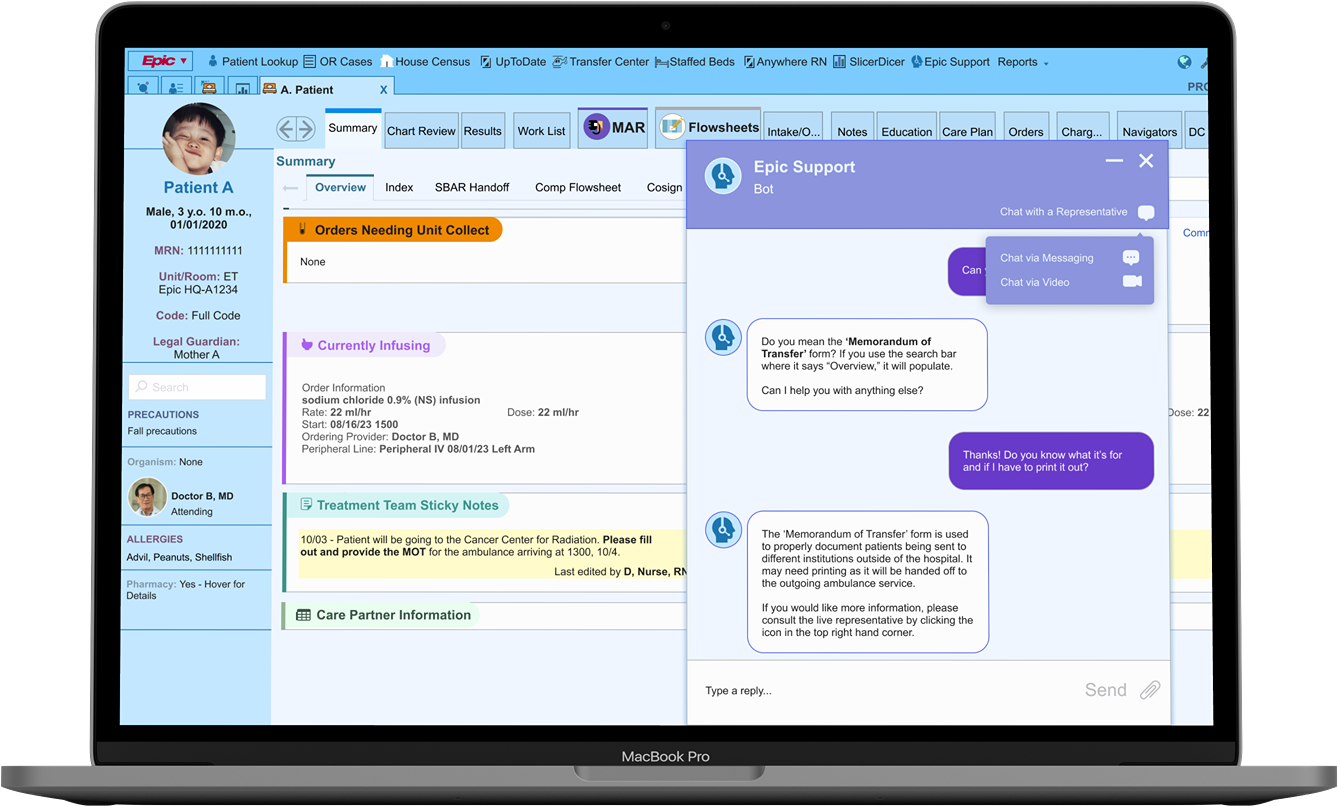
- To both further protect patient privacy and increase user flexibility and efficiency, a simpler form of communication was added.
- The option for all forms of communication will populate in a menu option once the “Chat with a Representative” icon is clicked.


Patient Lookup
OR Cases

House Census


UpToDate
Transfer Center

Staffed Beds

Anywhere RN
SlicerDicer

Epic Support
Reports


PROVIDER B.

Epic


A, Patient
X


Male, 3 y.o. 10 m.o.,
01/01/2020
MRN: 1111111111
Unit/Room: ET
Epic HQ-A1234
Code: Full Code
Legal Guardian:
Mother A
Patient A

Search
PRECAUTIONS
Fall precautions
Organism: None

Doctor B, MD
Attending
ALLERGIES
Advil, Peanuts, Shellfish
Pharmacy: Yes - Hover for Details

Summary
Chart Review
Results
Work List

MAR

Flowsheets
Intake/O...
Notes
Education
Care Plan
Orders
Charg...
Navigators
DC Info

Summary

Overview

Index
SBAR Handoff
Comp Flowsheet
Cosign
Active Orders
FIM Assessment


Overview


None

Orders Needing Unit Collect


All Unresulted Labs

(24h ago through 12 h from now)
Start
09/02/23 0600 > Complete Blood Count (CBC) Every 12 hours 08/29/23 1643
Ordered
Comment | Expand | Hide
Currently Infusing

Order Information
sodium chloride 0.9% (NS) infusion
Rate: 22 ml/hr Dose: 22 ml/hr
Start: 08/16/23 1500
Ordering Provider: Doctor B, MD
Peripheral Line: Peripheral IV 08/01/23 Left Arm
Last New Bag
Rate: 22 ml/hr Dose: 22 ml/hr
Documented: 10/01/23 1753
User: C, Provider, RN
Last Action
Rate/Dose Verify
Rate: 22 ml/hr . Dose: 22 ml/hr
Docume3 1832
User: C, Provider, RN
[Open MAR]
Treatment Team Sticky Notes

10/03 - Patient will be going to the Cancer Center for Radiation. Please fill out and provide the MOT for the ambulance arriving at 1300, 10/4.
Last edited by D, Nurse, RN on 10/03/23 at 1455
Comment
Sticky Notes to Physicians

10/01 - Please order PRN Ibuprofen for the patient.
ideo
Comment


Care Partner Information
Comment


Medical Problems
Comment

Epic Support
Bot
Chat with a Representative


Can you help me find the MOT form?
Type a reply...
Send


Do you mean the ‘Memorandum of Transfer’ form? If you use the search bar where it says “Overview,” it will populate.
Can I help you with anything else?
Thanks! Do you know what it’s for and if I have to print it out?


Chat via Messaging
Chat via Video


The ‘Memorandum of Transfer’ form is used to properly document patients being sent to different institutions outside of the hospital. It may need printing as it will be handed off to the outgoing ambulance service.
If you would like more information, please consult the live representative by clicking the icon in the top right hand corner.
- Clicking the chat bubble icon opens the options menu.
Chat window to include multiple sizes
- To further allow for user mobility and customization, the chat window can either be large for accessibility or smaller to increase user mobility on the page.
- The original option was to minimize the window and turn it into a tab to access the contents behind it, but having more options will lead to better user outcomes and satisfaction.

Patient Lookup
OR Cases

House Census
UpToDate
Transfer Center

Staffed Beds

Anywhere RN
SlicerDicer

Epic Support
Reports


PROVIDER B.
Epic


A, Patient
X


Male, 3 y.o. 10 m.o.,
01/01/2020
MRN: 1111111111
Unit/Room: ET
Epic HQ-A1234
Code: Full Code
Legal Guardian:
Mother A
Patient A

Search
PRECAUTIONS
Fall precautions
Organism: None

Doctor B, MD
Attending
ALLERGIES
Advil, Peanuts, Shellfish
Pharmacy: Yes - Hover for Details

Summary
Chart Review
Results
Work List

MAR

Flowsheets
Intake/O...
Notes
Education
Care Plan
Orders
Charg...
Navigators
DC Info

Summary

Overview

Index
SBAR Handoff
Comp Flowsheet
Cosign
Active Orders
FIM Assessment


Overview


None
Orders Needing Unit Collect

All Unresulted Labs

(24h ago through 12 h from now)
Start
09/02/23 0600 > Complete Blood Count (CBC) Every 12 hours 08/29/23 1643
Ordered
Comment | Expand | Hide
Currently Infusing

Order Information
sodium chloride 0.9% (NS) infusion
Rate: 22 ml/hr Dose: 22 ml/hr
Start: 08/16/23 1500
Ordering Provider: Doctor B, MD
Peripheral Line: Peripheral IV 08/01/23 Left Arm
Last New Bag
Rate: 22 ml/hr Dose: 22 ml/hr
Documented: 10/01/23 1753
User: C, Provider, RN
Last Action
Rate/Dose Verify
Rate: 22 ml/hr . Dose: 22 ml/hr
Docume3 1832
User: C, Provider, RN
[Open MAR]
Treatment Team Sticky Notes

10/03 - Patient will be going to the Cancer Center for Radiation. Please fill out and provide the MOT for the ambulance arriving at 1300, 10/4.
Last edited by D, Nurse, RN on 10/03/23 at 1455
Comment
Sticky Notes to Physicians

10/01 - Please order PRN Ibuprofen for the patient.
Last edited by E, Nurse, RN on 09/31/23 at 1455
Comment

Care Partner Information
Comment

Medical Problems
Comment
Epic Support
Bot
Chat with a Representative


Can you help me find the MOT form?
Type a reply...
Send


Do you mean the ‘Memorandum of Transfer’ form? If you use the search bar where it says “Overview,” it will populate.
Can I help you with anything else?
Thanks! Do you know what it’s for and if I have to print it out?

The ‘Memorandum of Transfer’ form is used to properly document patients being sent to different institutions outside of the hospital. It may need printing as it will be handed off to the outgoing ambulance service.
If you would like more information, please consult the live representative by clicking the icon in the top right hand corner.

- Clicking this shrink icon will incite the action of making the chat window smaller.


Patient Lookup
OR Cases

House Census
UpToDate
Transfer Center

Staffed Beds

Anywhere RN
SlicerDicer

Epic Support
Reports


PROVIDER B.
Epic


A, Patient
X


Male, 3 y.o. 10 m.o.,
01/01/2020
MRN: 1111111111
Unit/Room: ET
Epic HQ-A1234
Code: Full Code
Legal Guardian:
Mother A
Patient A

Search
PRECAUTIONS
Fall precautions
Organism: None

Doctor B, MD
Attending
ALLERGIES
Advil, Peanuts, Shellfish
Pharmacy: Yes - Hover for Details

Summary
Chart Review
Results
Work List

MAR

Flowsheets
Intake/O...
Notes
Education
Care Plan
Orders
Charg...
Navigators
DC Info

Summary

Overview

Index
SBAR Handoff
Comp Flowsheet
Cosign
Active Orders
FIM Assessment


Overview


None
Orders Needing Unit Collect

All Unresulted Labs

(24h ago through 12 h from now)
Start
09/02/23 0600 > Complete Blood Count (CBC) Every 12 hours 08/29/23 1643
Ordered
Comment | Expand | Hide
Currently Infusing


Order Information
sodium chloride 0.9% (NS) infusion
Rate: 22 ml/hr Dose: 22 ml/hr
Start: 08/16/23 1500
Ordering Provider: Doctor B, MD
Peripheral Line: Peripheral IV 08/01/23 Left Arm
Last New Bag
Rate: 22 ml/hr Dose: 22 ml/hr
Documented: 10/01/23 1753
User: C, Provider, RN
Last Action
Rate/Dose Verify
Rate: 22 ml/hr . Dose: 22 ml/hr
Docume3 1832
User: C, Provider, RN
[Open MAR]
Treatment Team Sticky Notes

10/03 - Patient will be going to the Cancer Center for Radiation. Please fill out and provide the MOT for the ambulance arriving at 1300, 10/4.
Last edited by D, Nurse, RN on 10/03/23 at 1455
Comment
Sticky Notes to Physicians

10/01 - Please order PRN Ibuprofen for the patient.
Last edited by E, Nurse, RN on 09/31/23 at 1455
Comment


Care Partner Information
Comment


Medical Problems
Comment
Epic Support
Bot
Chat with a Representative


Type a reply...
Send


Do you mean the ‘Memorandum of Transfer’ form? If you use the search bar where it says “Overview,” it will populate.
Can I help you with anything else?

Thanks! Do you know what it’s for and if I have to print it out?
The ‘Memorandum of Transfer’ form is used to properly document patients being sent to different institutions outside of the hospital. It may need printing as it will be handed off to the outgoing ambulance service.
If you would like more information, please consult the live representative by clicking the icon in the top right hand corner.


Results & Looking Forward
What’s next for this AI support feature?
Epic's expanding patient data repository poses challenges in locating specific details, resulting in heightened user stress and decreased accessibility.
The Problem
The Solution
Implement an AI support tool to aid users in navigating Epic's extensive patient data, enabling healthcare workers to optimize workflow and enhance patient care.
Accessible AI Chatbot Feature
- Patient Verification at activation promotes HIPAA (Health Insurance Portability and Accountability Act) ethics and prevents patient errors
- UI follows suit with conventional chat windows to minimize user learning curves
- Ability to minimize or maximize interface to fit user needs
Escalate to a Live Representative
- Adds extra user support to give viability to product help options
- Able to speak via video and text to fit hospital and HIPAA policies
View Final Prototype
Key Takeaways and Future Iterations
Given more time, I would...
- Compile data points consisting of what the support feature is most commonly used for, and create features of the application based on it
- Test an audio option format for live representative communication to go along with the intended video and text formats
- Create user flows that mesh together this support tool and an onboarding tutorial product
- Future iterations would likely benefit from task-specific AI applications
Role
Timeline
Tools
Responsibilities
UI/UX Designer
October 2023 - November 2023 (4 Weeks)
ChatGPT, Figma, Giphy, Google Workspace
User Research & Testing, Data Analysis, Information Architecture, Wireframing, Visual Design, Prototyping
Male, 31
Female, 30
Female, 22
Female, 25
Female, 42
Male, 34
Female, 40
Male, 47

I conducted user testing with 12 participants, in person and via Facetime video calls.
Usability Task:
Female, 40
Angelo Arambulo ⏤ 2025















Epic
The Epic EMR interface efficiently manages patient data and workflows, simplifying care coordination and documentation in healthcare settings.
Role
UI/UX Designer
Timeline
October 2023 - November 2023 (4 Weeks)
Tools
ChatGPT, Figma, Giphy, Google Workspace
Responsibilities
User Research & Testing, Data Analysis, Information Architecture, Wireframing, Visual Design, Prototyping
What is the product?
What is Epic’s support feature?
Epic's expanding patient data repository poses challenges in locating specific details, resulting in heightened user stress and decreased accessibility.
The Problem
The Solution
Implement an AI support tool to aid users in navigating Epic's extensive patient data, enabling healthcare workers to optimize workflow and enhance patient care.

Accessible AI Chatbot Feature
- Patient Verification at activation promotes HIPAA (Health Insurance Portability and Accountability Act) ethics and prevents patient errors
- UI follows suit with conventional chat windows to minimize user learning curves
- Ability to minimize or maximize interface to fit user needs

Escalate to a Live Representative
- Adds extra user support to give viability to product help options
- Able to speak via video and text to fit hospital and HIPAA policies
View Final Prototype
Research Phase
What steps did I take to arrive at this solution?
I conducted a competitive analysis to further understand the relationship between various electronic healthcare medical records and user/clinician satisfaction. My research frequently indicated usability issues, and a slow ability to implement product updates due to the amount of resources needed to manage data.
Epic
Efficient inter-operability
High initial & maintenance costs
Popular EMR
“Cerner Millennium” synchs third party products
Features have high learning curve
Integration with pharmaceutical products
Slower than competitors in updating features
Newly implemented “AI Virtual Assistant”
Common inter-
operability challenges & training needs
Cerner
Allscripts
Meditech
Coming away from the twelve user interviews I conducted, I compiled the gathered data into two major themes: Clarity & Utility.
The First Theme: Clarity
Users will search for clear and concise information to decrease cognitive workload, and streamline their flow.
“Epic does a good job showing lab results because it includes resources for reference ranges and is organized by lab classification {making it easier to skim through}.”

Clinical Pharmacist
Users stress this value heavily, citing it as an overarching rationale when asked how Epic can be directly improved.
The amount of friction induced by task flows (both familiar and unfamiliar) directly affects the quality of satisfaction healthcare professionals have with their jobs.
“In psychiatry, many of our notes should be censored from patients, but this option has to be done manually by clicking a heart in the upper right-hand corner of the note and selecting a reason for censorship. I wish this would pop up automatically when we create the psychiatry consult/progress note, so that we do not forget to censor it.”

Medical Resident
“It can be quick and easy to find a patient if I use the system lists and the Medical Record Numbers that I’m used to.”

Inpatient Secretary
Users often found Epic (or other EMRs) easy to use when completing flows that are common in their daily tasks.
When it came to new task flows, especially with those that did not have clear indicators, they would often look outside of the product for quick solutions (e.g. coworkers, superiors, etc).
The Second Theme: Utility
Users want simple resources and concise responses to help them rectify the issues they encounter.
Users are open to the idea of a new chatbot helping them. However, first impressions are essential here; Users asking for help are often in a state of vulnerability.
Utilizing an available chatbot that is unable to help when used, elicits a visceral, overly negative opinion from the user. The inverse is true as well.
“I don’t like it when AI support continues to try to help me at length, even when I know that my inquiry is likely too specific to be resolved with AI (or if it doesn’t give me the option to opt-out).”

Registered Nurse
“I tried to reschedule an appointment for car maintenance and the chatbot couldn’t help me at all…. I had to call to reschedule, so now I try not to use them.”

Registered Nurse
“The chatbot helped me to switch to a subscription with smaller toys {for my dog}. {Now} I look for a chatbot on every single site I use.”

Physical Therapist
If there were a sliding scale that indicated how willingly users would utilize a chatbot or how much trust they would put into it in the future, the product’s inability to help after users wasted energy would lower its position on said scale.
Still, users will often look outside themselves for help if they can’t quickly figure out a problem.
“Oh, maybe Epic should have a function for contacting their Help desk? I’ve never used it, but if it is there. I’d probably use it.”


Nurse Manager
“I would usually call someone, like pathology or imaging, if I can’t find any needed patient results posted online.”

Attending Doctor
From User Input -> Empathic, Empirical Data
Personas
Synthesizing the interview data, I created two personas representing groups of individuals who often run into trouble utilizing Epic during work hours. Although their scenarios may differ, many of their core needs remain similar, and thus, the personas should be focused on serving a larger population of clinicians and healthcare-adjacent workers.
Consider the persona scenario below:
Yvonne

Yvonne is a newly graduated registered nurse working at an endocrine inpatient floor in a children’s hospital.
She is asked to provide the MoT (Memorandum of Transfer) form for her off-service cancer patient undergoing radiation at a different institution.
Yvonne and her coworker need to learn how to find the MoT form, and are pressed for time.
With an AI support feature, or with the help of a live representative, Yvonne could ensure her patients makes their important appointments, and reduce the cognitive workload needed to solve the problem.
How might we create a support feature that is easy to use, reliable, and helps to decrease the stress load within user flows?
Ideation Phase
How did I turn this data into serviceable actions?
Given that a numerous resources are utilized to manage system updates to Epic’s EMR product, I decided to work on the essentials of the support feature that would be less likely to hinder the engineering and maintenance of the product. Although some nice add-ons would work well for the chatbot, they may affect the amount of resources needed for a first rollout.
Must Have
Must Have
- Clickable Icon
- Message Box
- Epic AI
- Live Support
Nice to Have
- Onboarding Tutorial Tool
- Onboarding Icon
Surprising
- AI Mascot
Comes Later
- Task Specific AI
Straightforward task flows will help users feel control in their search for task clarity. While each resolution method provided is a different means, the general steps taken to fix user issues are congruent.
The following methods should comfort the user in its ease of operation.
Support Resource - AI Chat
Support Resource - Live Representative
Design Phase
How did I organize the structure and create the features?


Patient Information
Provider Information + Precautions
Navigation Bar
Support Icon
Tabs
Sub Tabs
Search
Misc Information
Misc Information
Misc Information
Misc Information
Misc Information
Misc Information
Misc Information

Support Representative
Navigation Bar


Patient Information
Provider Information + Precautions
Navigation Bar
Support Icon
Tabs
Sub Tabs
Search
Misc Information
Misc Information
Misc Information
Misc Information
Misc Information
Misc Information
Misc Information
I considered several criteria when working through low and mid-fidelity; Below are the needs I addressed when consolidating all the collected information into physical designs.
User Needs
Applied Design
Fast and organized method of accessing the support tool
- Icon to be implemented into the primary toolbar for instant availability
- Recognizable support icon, so user eyes can scan and easily recognize
- Similar layout to popular desktop messengers with a rectangular, card layout
- Flow that allows fast back and forth, with indicated user avatars
- Addition of a discernible button to immediately switch to representative feed
- Toolbar to help provide resources during interaction
Familiar UI to lower the learning curve when using the support tool
Ability to quickly escalate to a live representative to ensure assistance
The integration of the support AI should appear seamless into the current Epic interface. My initial idea is to place it into the primary navigation bar, and update it as necessary if the placement experiences friction or delays access times during user testing.
As evidenced by the prior research interviews, users usually reach out for help during times of duress. To assist users as optimally as possible, the UI must be approachable and straightforward.
I decided for the live rep UI to appear as a small screen, so that the user may click and navigate to the other features of the Epic interface while getting guidance on their problems.
A toolbar would ideally be featured below, with the ability to send screen captures or attach files that might help to end the query quickly.


Patient Information
Provider Information + Precautions
Navigation Bar
Support Icon
Tabs
Sub Tabs
Search
Misc Information
Misc Information
Misc Information
Misc Information
Misc Information
Misc Information
Misc Information

How can I assist you?
Use this link/icon to speak to a live representative
Type Text Here
Support
Patient Information
Provider Information + Precautions
Navigation Bar
Support Icon
Tabs
Sub Tabs
Search
Misc Information
Misc Information
Misc Information
Misc Information
Misc Information
Misc Information
Misc Information
How can I assist you?
Use this link/icon to speak to a live representative
Type Text Here
Support
User testing initiated several changes during the hi-fi creation.
- Patient Identification is confirmed in the support chat prior to query continuation.
During low-fidelity testing, a user mentioned that the scenario’s glaring issue was the chatbot’s negligence in double-checking ID.
Doing so will allow the feature to protect patient care and safety further, and ensure compliance with HIPAA laws.
The hi-fi frames were created to fully mimic Epic’s entire graphic interface with the support icon and text button added to the central, top navigation bar.
The additional usage of text next to the chosen “person with a headset” icon should ultimately help the user find support as quickly as they may need to.
The initial choice of the support AI colors and fonts mean to mimic Epic’s current aesthetic choices and create further, seamless cohesion.
The slightly darker hues of blue should help to slightly differentiate the box as part of the screen’s forefront when in use.



Patient Lookup

OR Cases

House Census


UpToDate
Transfer Center

Staffed Beds

Anywhere RN
SlicerDicer

Epic Support
Reports


PROVIDER B.

Epic


A, Patient
X



Male, 3 y.o. 10 m.o.,
01/01/2020
MRN: 1111111111
Unit/Room: ET
Epic HQ-A1234
Code: Full Code
Legal Guardian:
Mother A
Patient A

Search
PRECAUTIONS
Fall precautions
Organism: None

Doctor B, MD
Attending
ALLERGIES
Advil, Peanuts, Shellfish
Pharmacy: Yes - Hover for Details

Summary
Chart Review
Results
Work List

MAR

Flowsheets
Intake/O...
Notes
Education
Care Plan
Orders
Charg...
Navigators
DC Info

Summary

Overview


Index
SBAR Handoff
Comp Flowsheet
Cosign
Active Orders
FIM Assessment


Overview


None

Orders Needing Unit Collect


All Unresulted Labs

(24h ago through 12 h from now)
Start
09/02/23 0600 > Complete Blood Count (CBC) Every 12 hours 08/29/23 1643
Ordered
Comment | Expand | Hide
Currently Infusing


Order Information
sodium chloride 0.9% (NS) infusion
Rate: 22 ml/hr Dose: 22 ml/hr
Start: 08/16/23 1500
Ordering Provider: Doctor B, MD
Peripheral Line: Peripheral IV 08/01/23 Left Arm
Last New Bag
Rate: 22 ml/hr Dose: 22 ml/hr
Documented: 10/01/23 1753
User: C, Provider, RN
Last Action
Rate/Dose Verify
Rate: 22 ml/hr . Dose: 22 ml/hr
Documented: 10/01/23 1832
User: C, Provider, RN
[Open MAR]
Treatment Team Sticky Notes

10/03 - Patient will be going to the Cancer Center for Radiation. Please fill out and provide the MOT for the ambulance arriving at 1300, 10/4.
Last edited by D, Nurse, RN on 10/03/23 at 1455
Comment
Sticky Notes to Physicians

10/01 - Please order PRN Ibuprofen for the patient.
Last edited by E, Nurse, RN on 09/31/23 at 1455
Comment


Care Partner Information
Comment


Medical Problems
Comment
Epic icon is located in the topmost navigation bar, with an icon color congruent to the other blue icons in on the same screen.





Patient Lookup

OR Cases

House Census


UpToDate
Transfer Center

Staffed Beds

Anywhere RN
SlicerDicer

Epic Support
Reports


PROVIDER B.

Epic


A, Patient
X



Male, 3 y.o. 10 m.o.,
01/01/2020
MRN: 1111111111
Unit/Room: ET
Epic HQ-A1234
Code: Full Code
Legal Guardian:
Mother A
Patient A

Search
PRECAUTIONS
Fall precautions
Organism: None

Doctor B, MD
Attending
ALLERGIES
Advil, Peanuts, Shellfish
Pharmacy: Yes - Hover for Details

Summary
Chart Review
Results
Work List

MAR

Flowsheets
Intake/O...
Notes
Education
Care Plan
Orders
Charg...
Navigators
DC Info

Summary

Overview


Index
SBAR Handoff
Comp Flowsheet
Cosign
Active Orders
FIM Assessment


Overview


None

Orders Needing Unit Collect


All Unresulted Labs

(24h ago through 12 h from now)
Start
09/02/23 0600 > Complete Blood Count (CBC) Every 12 hours 08/29/23 1643
Ordered
Comment | Expand | Hide
Currently Infusing


Order Information
sodium chloride 0.9% (NS) infusion
Rate: 22 ml/hr Dose: 22 ml/hr
Start: 08/16/23 1500
Ordering Provider: Doctor B, MD
Peripheral Line: Peripheral IV 08/01/23 Left Arm
Last New Bag
Rate: 22 ml/hr Dose: 22 ml/hr
Documented: 10/01/23 1753
User: C, Provider, RN
Last Action
Rate/Dose Verify
Rate: 22 ml/hr . Dose: 22 ml/hr
Docume3 1832
User: C, Provider, RN
[Open MAR]
Treatment Team Sticky Notes

10/03 - Patient will be going to the Cancer Center for Radiation. Please fill out and provide the MOT for the ambulance arriving at 1300, 10/4.
Last edited by D, Nurse, RN on 10/03/23 at 1455
Comment
Sticky Notes to Physicians

10/01 - Please order PRN Ibuprofen for the patient.
Last edited by E, Nurse, RN on 09/31/23 at 1455
Comment


Care Partner Information
Comment


Medical Problems
Comment
Epic Support
Bot

Minimize


Exit

Please verify that you are requesting help for Patient A, MRN: 1111111111 before continuing.
How can I assist you?
Type a reply...

Can you help me find the MOT form?

Do you mean the ‘Memorandum of Transfer’ form? If you use the search bar where it says “Overview,” it will populate.
Can I help you with anything else?
Thanks! Do you know what it’s for and if I have to print it out?
Support chat is located on the right most side, as to keep patient information visible on the left.
Minimize button located in the top right in order to hide the chatbot and access the interface hidden under it.
Stroke added to add dimension and separate the chat box from the rest of the interface.


Same background blue hue chosen here to convey visual harmony.



Patient Lookup

OR Cases

House Census


UpToDate
Transfer Center

Staffed Beds

Anywhere RN
SlicerDicer

Epic Support
Reports


PROVIDER B.

Epic


A, Patient
X



Male, 3 y.o. 10 m.o.,
01/01/2020
MRN: 1111111111
Unit/Room: ET
Epic HQ-A1234
Code: Full Code
Legal Guardian:
Mother A
Patient A

Search
PRECAUTIONS
Fall precautions
Organism: None

Doctor B, MD
Attending
ALLERGIES
Advil, Peanuts, Shellfish
Pharmacy: Yes - Hover for Details

Summary
Chart Review
Results
Work List

MAR

Flowsheets
Intake/O...
Notes
Education
Care Plan
Orders
Charg...
Navigators
DC Info

Summary

Overview


Index
SBAR Handoff
Comp Flowsheet
Cosign
Active Orders
FIM Assessment


Overview


None

Orders Needing Unit Collect


All Unresulted Labs

(24h ago through 12 h from now)
Start
09/02/23 0600 > Complete Blood Count (CBC) Every 12 hours 08/29/23 1643
Ordered
Comment | Expand | Hide
Currently Infusing


Order Information
sodium chloride 0.9% (NS) infusion
Rate: 22 ml/hr Dose: 22 ml/hr
Start: 08/16/23 1500
Ordering Provider: Doctor B, MD
Peripheral Line: Peripheral IV 08/01/23 Left Arm
Last New Bag
Rate: 22 ml/hr Dose: 22 ml/hr
Documented: 10/01/23 1753
User: C, Provider, RN
Last Action
Rate/Dose Verify
Rate: 22 ml/hr . Dose: 22 ml/hr
Docume3 1832
User: C, Provider, RN
[Open MAR]
Treatment Team Sticky Notes

10/03 - Patient will be going to the Cancer Center for Radiation. Please fill out and provide the MOT for the ambulance arriving at 1300, 10/4.
Last edited by D, Nurse, RN on 10/03/23 at 1455
Comment
Sticky Notes to Physicians

10/01 - Please order PRN Ibuprofen for the patient.
Last edited by E, Nurse, RN on 09/31/23 at 1455
Comment


Care Partner Information
Comment


Medical Problems
Comment
Erin
Live Representative

Minimize


Exit


Initial interface for the live representative video feed is laid out similarly to the chat window, but will likely need further iterating to optimize the layout.
After meeting with my mentor, several changes to the frames were made to further improve usability and accessibility for the user.
The changes made include:
- The collapse/close text was removed from the support chat to simplify the chat header.
- A video chat icon was added to the header to be closer to the other options.
- The ability to upload a file was added with the recognizable “staple” icon.
- To further separate the chat window from the rest of the interface, purple replaced blue as the primary color. A drop shadow of 4 was also added to the stroke outline.
- The video chat feed with the live representative was shrunk in size to allow for continued access to the chat dialogue.


Patient Lookup
OR Cases

House Census
UpToDate
Transfer Center

Staffed Beds

Anywhere RN
SlicerDicer
Epic Support
Reports


PROVIDER B.
Epic


A, Patient
X



Male, 3 y.o. 10 m.o.,
01/01/2020
MRN: 1111111111
Unit/Room: ET
Epic HQ-A1234
Code: Full Code
Legal Guardian:
Mother A
Patient A
Search
PRECAUTIONS
Fall precautions
Organism: None

Doctor B, MD
Attending
ALLERGIES
Advil, Peanuts, Shellfish
Pharmacy: Yes - Hover for Details

Summary
Chart Review
Results
Work List

MAR

Flowsheets
Intake/O...
Notes
Education
Care Plan
Orders
Charg...
Navigators
DC Info

Summary

Overview

Index
SBAR Handoff
Comp Flowsheet
Cosign
Active Orders
FIM Assessment


Overview


None
Orders Needing Unit Collect


All Unresulted Labs

(24h ago through 12 h from now)
Start
09/02/23 0600 > Complete Blood Count (CBC) Every 12 hours 08/29/23 1643
Ordered
Comment | Expand | Hide
Currently Infusing

Order Information
sodium chloride 0.9% (NS) infusion
Rate: 22 ml/hr Dose: 22 ml/hr
Start: 08/16/23 1500
Ordering Provider: Doctor B, MD
Peripheral Line: Peripheral IV 08/01/23 Left Arm
Last New Bag
Rate: 22 ml/hr Dose: 22 ml/hr
Documented: 10/01/23 1753
User: C, Provider, RN
Last Action
Rate/Dose Verify
Rate: 22 ml/hr . Dose: 22 ml/hr
Docume3 1832
User: C, Provider, RN
[Open MAR]
Treatment Team Sticky Notes

10/03 - Patient will be going to the Cancer Center for Radiation. Please fill out and provide the MOT for the ambulance arriving at 1300, 10/4.
Last edited by D, Nurse, RN on 10/03/23 at 1455
Comment
Sticky Notes to Physicians

10/01 - Please order PRN Ibuprofen for the patient.
Last edited by E, Nurse, RN on 09/31/23 at 1455
Comment


Care Partner Information
Comment


Medical Problems
Comment
Epic Support
Bot
Chat with a Representative


Can you help me find the MOT form?
Type a reply...
Send


Do you mean the ‘Memorandum of Transfer’ form? If you use the search bar where it says “Overview,” it will populate.
Can I help you with anything else?
Thanks! Do you know what it’s for and if I have to print it out?

The ‘Memorandum of Transfer’ form is used to properly document patients being sent to different institutions outside of the hospital. It may need printing as it will be handed off to the outgoing ambulance service.
If you would like more information, please consult the live representative by clicking the icon in the top right hand corner.


Switched to flat UI for cohesion.
Text added, as the icon’s function is more specific than simple action (i.e. minimize or close).
Live feed also has its own close/minimize icons in the video feed in order to intuit icon purpose and keep other parts of the interface from getting cluttered.



Patient Lookup

OR Cases

House Census


UpToDate
Transfer Center

Staffed Beds

Anywhere RN
SlicerDicer

Epic Support
Reports


PROVIDER B.

Epic


A, Patient
X



Male, 3 y.o. 10 m.o.,
01/01/2020
MRN: 1111111111
Unit/Room: ET
Epic HQ-A1234
Code: Full Code
Legal Guardian:
Mother A
Patient A

Search
PRECAUTIONS
Fall precautions
Organism: None

Doctor B, MD
Attending
ALLERGIES
Advil, Peanuts, Shellfish
Pharmacy: Yes - Hover for Details

Summary
Chart Review
Results
Work List

MAR

Flowsheets
Intake/O...
Notes
Education
Care Plan
Orders
Charg...
Navigators
DC Info

Summary

Overview


Index
SBAR Handoff
Comp Flowsheet
Cosign
Active Orders
FIM Assessment


Memorandum of Transfer


None

Orders Needing Unit Collect


All Unresulted Labs

(24h ago through 12 h from now)
Start
09/02/23 0600 > Complete Blood Count (CBC) Every 12 hours 08/29/23 1643
Ordered
Comment | Expand | Hide
Currently Infusing


Order Information
sodium chloride 0.9% (NS) infusion
Rate: 22 ml/hr Dose: 22 ml/hr
Start: 08/16/23 1500
Ordering Provider: Doctor B, MD
Peripheral Line: Peripheral IV 08/01/23 Left Arm
Last New Bag
Rate: 22 ml/hr Dose: 22 ml/hr
Documented: 10/01/23 1753
User: C, Provider, RN
Last Action
Rate/Dose Verify
Rate: 22 ml/hr . Dose: 22 ml/hr
Documented: 10/01/23 1832
User: C, Provider, RN
[Open MAR]
Treatment Team Sticky Notes

10/03 - Patient will be going to the Cancer Center for Radiation. Please fill out and provide the MOT for the ambulance arriving at 1300, 10/4.
Last edited by D, Nurse, RN on 10/03/23 at 1455
Comment
Sticky Notes to Physicians

10/01 - Please order PRN Ibuprofen for the patient.
Last edited by E, Nurse, RN on 09/31/23 at 1455
Comment


Care Partner Information
Comment


Medical Problems
Comment
<

Tab option is visible as a quick CTA button.
Testing & Iterations
How did Usability Testing go?
I conducted user testing with 12 participants, in person and via Facetime video calls.
Usability Task:
Results and Findings:
All 12 users were 100% successful in utilizing the chat function once it was open, transferring to a representative, and finally finishing finding the “MOT form.”
- All users noted that the support chat window was easy to use, and several users noted that it was a more helpful, or responsive, informative version of the search function currently provided by Epic.
- The side panel structure and the ability to tab the chat were well received by users, as they felt they had control and freedom during the task flow.
Overall, the feature was noted to be intuitive, user-friendly, and enjoyable by the majority of users.
Iteration Focus & Possible Additions:
Most of the suggestions or possible addendums to the product were not task flow related, or related to the feature interface.
Instead, some healthcare professionals had suggestions regarding the feature’s role in real-world situations.
“I think, depending on the location of the video call it could be beneficial to have different forms of communication with an Epic employee... Just to further enhance patient security.”
Nurse Manager
Because of this, and the fact that the testing had quite favorable results, it made sense to focus on the following edits in the next batch of final iterations.
- Supplementary options for live representative communication, such as a text function or call function.
- Additional features to the chat window UI that can increase user control and freedom on the interface.
Key Improvements
Addition of the Option to Chat with a Live Representative
- To both further protect patient privacy and increase user flexibility and efficiency, a simpler form of communication was added.
- The option for all forms of communication will populate in a menu option once the “Chat with a Representative” icon is clicked.



Patient Lookup

OR Cases

House Census


UpToDate
Transfer Center

Staffed Beds

Anywhere RN
SlicerDicer

Epic Support
Reports


PROVIDER B.

Epic


A, Patient
X



Male, 3 y.o. 10 m.o.,
01/01/2020
MRN: 1111111111
Unit/Room: ET
Epic HQ-A1234
Code: Full Code
Legal Guardian:
Mother A
Patient A

Search
PRECAUTIONS
Fall precautions
Organism: None

Doctor B, MD
Attending
ALLERGIES
Advil, Peanuts, Shellfish
Pharmacy: Yes - Hover for Details

Summary
Chart Review
Results
Work List

MAR

Flowsheets
Intake/O...
Notes
Education
Care Plan
Orders
Charg...
Navigators
DC Info

Summary

Overview


Index
SBAR Handoff
Comp Flowsheet
Cosign
Active Orders
FIM Assessment


Overview


None

Orders Needing Unit Collect


All Unresulted Labs

(24h ago through 12 h from now)
Start
09/02/23 0600 > Complete Blood Count (CBC) Every 12 hours 08/29/23 1643
Ordered
Comment | Expand | Hide
Currently Infusing


Order Information
sodium chloride 0.9% (NS) infusion
Rate: 22 ml/hr Dose: 22 ml/hr
Start: 08/16/23 1500
Ordering Provider: Doctor B, MD
Peripheral Line: Peripheral IV 08/01/23 Left Arm
Last New Bag
Rate: 22 ml/hr Dose: 22 ml/hr
Documented: 10/01/23 1753
User: C, Provider, RN
Last Action
Rate/Dose Verify
Rate: 22 ml/hr . Dose: 22 ml/hr
Docume3 1832
User: C, Provider, RN
[Open MAR]
Treatment Team Sticky Notes

10/03 - Patient will be going to the Cancer Center for Radiation. Please fill out and provide the MOT for the ambulance arriving at 1300, 10/4.
Last edited by D, Nurse, RN on 10/03/23 at 1455
Comment
Sticky Notes to Physicians

10/01 - Please order PRN Ibuprofen for the patient.
ideo
Comment


Care Partner Information
Comment


Medical Problems
Comment

Epic Support
Bot
Chat with a Representative


Can you help me find the MOT form?
Type a reply...
Send


Do you mean the ‘Memorandum of Transfer’ form? If you use the search bar where it says “Overview,” it will populate.
Can I help you with anything else?
Thanks! Do you know what it’s for and if I have to print it out?


Chat via Messaging
Chat via Video


The ‘Memorandum of Transfer’ form is used to properly document patients being sent to different institutions outside of the hospital. It may need printing as it will be handed off to the outgoing ambulance service.
If you would like more information, please consult the live representative by clicking the icon in the top right hand corner.

Clicking this icon opens the options menu.
Chat window to include multiple sizes
- To further allow for user mobility and customization, the chat window can either be large for accessibility or smaller to increase user mobility on the page.
- The original option was to minimize the window and turn it into a tab to access the contents behind it, but having more options will lead to better user outcomes and satisfaction.

Patient Lookup
OR Cases

House Census


UpToDate
Transfer Center

Staffed Beds

Anywhere RN
SlicerDicer

Epic Support
Reports


PROVIDER B.

Epic


A, Patient
X



Male, 3 y.o. 10 m.o.,
01/01/2020
MRN: 1111111111
Unit/Room: ET
Epic HQ-A1234
Code: Full Code
Legal Guardian:
Mother A
Patient A

Search
PRECAUTIONS
Fall precautions
Organism: None

Doctor B, MD
Attending
ALLERGIES
Advil, Peanuts, Shellfish
Pharmacy: Yes - Hover for Details

Summary
Chart Review
Results
Work List

MAR

Flowsheets
Intake/O...
Notes
Education
Care Plan
Orders
Charg...
Navigators
DC Info

Summary

Overview

Index
SBAR Handoff
Comp Flowsheet
Cosign
Active Orders
FIM Assessment


Overview


None

Orders Needing Unit Collect

All Unresulted Labs

(24h ago through 12 h from now)
Start
09/02/23 0600 > Complete Blood Count (CBC) Every 12 hours 08/29/23 1643
Ordered
Comment | Expand | Hide
Currently Infusing

Order Information
sodium chloride 0.9% (NS) infusion
Rate: 22 ml/hr Dose: 22 ml/hr
Start: 08/16/23 1500
Ordering Provider: Doctor B, MD
Peripheral Line: Peripheral IV 08/01/23 Left Arm
Last New Bag
Rate: 22 ml/hr Dose: 22 ml/hr
Documented: 10/01/23 1753
User: C, Provider, RN
Last Action
Rate/Dose Verify
Rate: 22 ml/hr . Dose: 22 ml/hr
Docume3 1832
User: C, Provider, RN
[Open MAR]
Treatment Team Sticky Notes

10/03 - Patient will be going to the Cancer Center for Radiation. Please fill out and provide the MOT for the ambulance arriving at 1300, 10/4.
Last edited by D, Nurse, RN on 10/03/23 at 1455
Comment
Sticky Notes to Physicians

10/01 - Please order PRN Ibuprofen for the patient.
Last edited by E, Nurse, RN on 09/31/23 at 1455
Comment


Care Partner Information
Comment

Medical Problems
Comment
Epic Support
Bot
Chat with a Representative


Can you help me find the MOT form?
Type a reply...
Send


Do you mean the ‘Memorandum of Transfer’ form? If you use the search bar where it says “Overview,” it will populate.
Can I help you with anything else?
Thanks! Do you know what it’s for and if I have to print it out?

The ‘Memorandum of Transfer’ form is used to properly document patients being sent to different institutions outside of the hospital. It may need printing as it will be handed off to the outgoing ambulance service.
If you would like more information, please consult the live representative by clicking the icon in the top right hand corner.

&



Patient Lookup

OR Cases

House Census


UpToDate
Transfer Center

Staffed Beds

Anywhere RN
SlicerDicer

Epic Support
Reports


PROVIDER B.

Epic


A, Patient
X



Male, 3 y.o. 10 m.o.,
01/01/2020
MRN: 1111111111
Unit/Room: ET
Epic HQ-A1234
Code: Full Code
Legal Guardian:
Mother A
Patient A

Search
PRECAUTIONS
Fall precautions
Organism: None

Doctor B, MD
Attending
ALLERGIES
Advil, Peanuts, Shellfish
Pharmacy: Yes - Hover for Details

Summary
Chart Review
Results
Work List

MAR

Flowsheets
Intake/O...
Notes
Education
Care Plan
Orders
Charg...
Navigators
DC Info

Summary

Overview


Index
SBAR Handoff
Comp Flowsheet
Cosign
Active Orders
FIM Assessment


Overview


None

Orders Needing Unit Collect


All Unresulted Labs

(24h ago through 12 h from now)
Start
09/02/23 0600 > Complete Blood Count (CBC) Every 12 hours 08/29/23 1643
Ordered
Comment | Expand | Hide
Currently Infusing


Order Information
sodium chloride 0.9% (NS) infusion
Rate: 22 ml/hr Dose: 22 ml/hr
Start: 08/16/23 1500
Ordering Provider: Doctor B, MD
Peripheral Line: Peripheral IV 08/01/23 Left Arm
Last New Bag
Rate: 22 ml/hr Dose: 22 ml/hr
Documented: 10/01/23 1753
User: C, Provider, RN
Last Action
Rate/Dose Verify
Rate: 22 ml/hr . Dose: 22 ml/hr
Docume3 1832
User: C, Provider, RN
[Open MAR]
Treatment Team Sticky Notes

10/03 - Patient will be going to the Cancer Center for Radiation. Please fill out and provide the MOT for the ambulance arriving at 1300, 10/4.
Last edited by D, Nurse, RN on 10/03/23 at 1455
Comment
Sticky Notes to Physicians

10/01 - Please order PRN Ibuprofen for the patient.
Last edited by E, Nurse, RN on 09/31/23 at 1455
Comment


Care Partner Information
Comment


Medical Problems
Comment
Epic Support
Bot
Chat with a Representative


Type a reply...
Send


Do you mean the ‘Memorandum of Transfer’ form? If you use the search bar where it says “Overview,” it will populate.
Can I help you with anything else?

Thanks! Do you know what it’s for and if I have to print it out?
The ‘Memorandum of Transfer’ form is used to properly document patients being sent to different institutions outside of the hospital. It may need printing as it will be handed off to the outgoing ambulance service.
If you would like more information, please consult the live representative by clicking the icon in the top right hand corner.


Clicking this shrink icon will incite the action of making the chat window smaller.
Results & Looking Forward
What’s next for this AI support feature?
Epic's expanding patient data repository poses challenges in locating specific details, resulting in heightened user stress and decreased accessibility.
The Problem
The Solution
Implement an AI support tool to aid users in navigating Epic's extensive patient data, enabling healthcare workers to optimize workflow and enhance patient care.
Accessible AI Chatbot Feature
- Patient Verification at activation promotes HIPAA (Health Insurance Portability and Accountability Act) ethics and prevents patient errors
- UI follows suit with conventional chat windows to minimize user learning curves
- Ability to minimize or maximize interface to fit user needs
Escalate to a Live Representative
- Adds extra user support to give viability to product help options
- Able to speak via video and text to fit hospital and HIPAA policies
View Final Prototype
Key Takeaways and Future Iterations
Given more time, I would...
- Compile data points consisting of what the support feature is most commonly used for, and create features of the application based on it
- Test an audio option format for live representative communication to go along with the intended video and text formats
- Create user flows that mesh together this support tool and an onboarding tutorial product
- Future iterations would likely benefit from task-specific AI applications
Angelo Arambulo ⏤ 2024
Epic EMR (Electronic Medical Record) is a comprehensive software system designed for healthcare organizations to manage patient records, workflows, and medical information electronically.
Epic’s support feature is an AI “Quick Assistance” chatbot integrated directly within the platform.
This chatbot would provide on-demand support to healthcare professionals navigating the Epic system, offering real-time guidance, troubleshooting assistance, and answers to common queries.
The chatbot could also proactively suggest relevant resources, such as help articles or training materials, based on the user’s context within the EMR.
By offering immediate support within the workflow, this feature would enhance user proficiency, reduce frustration, and ultimately optimize the utilization of the Epic EMR system.
Competitive Analysis
Existing EMRs continue to face the challenge of maximizing presented data points and minimizing product learning curves, which occasionally causes user stress and error.
User Interviews & Insights
Male, 31
Female, 30
Female, 22
Female, 25
Female, 42
Male, 34
Female, 40
Male, 47
Personas
The question at hand...
Prioritization
Task Flows
With a focus on AI chat essentials, I decided to create two connected task flows that should be utilized to solve issues that arise during Epic usage.
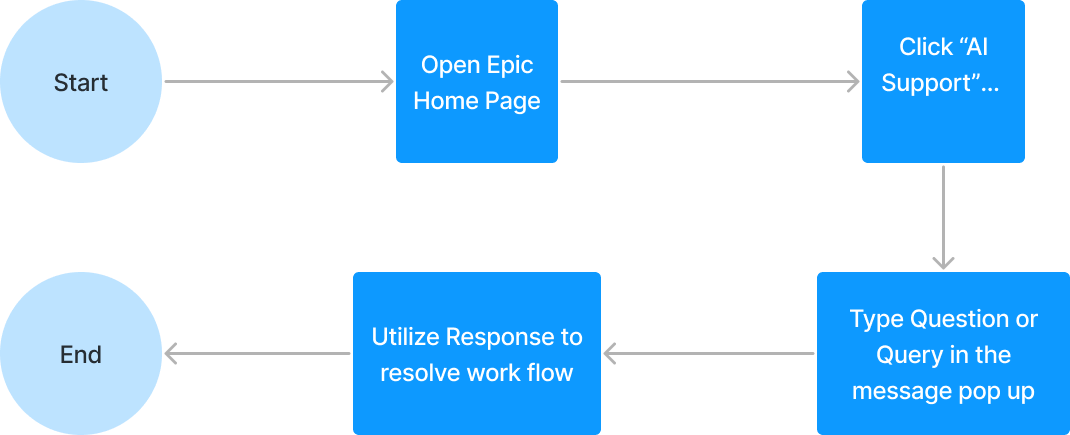
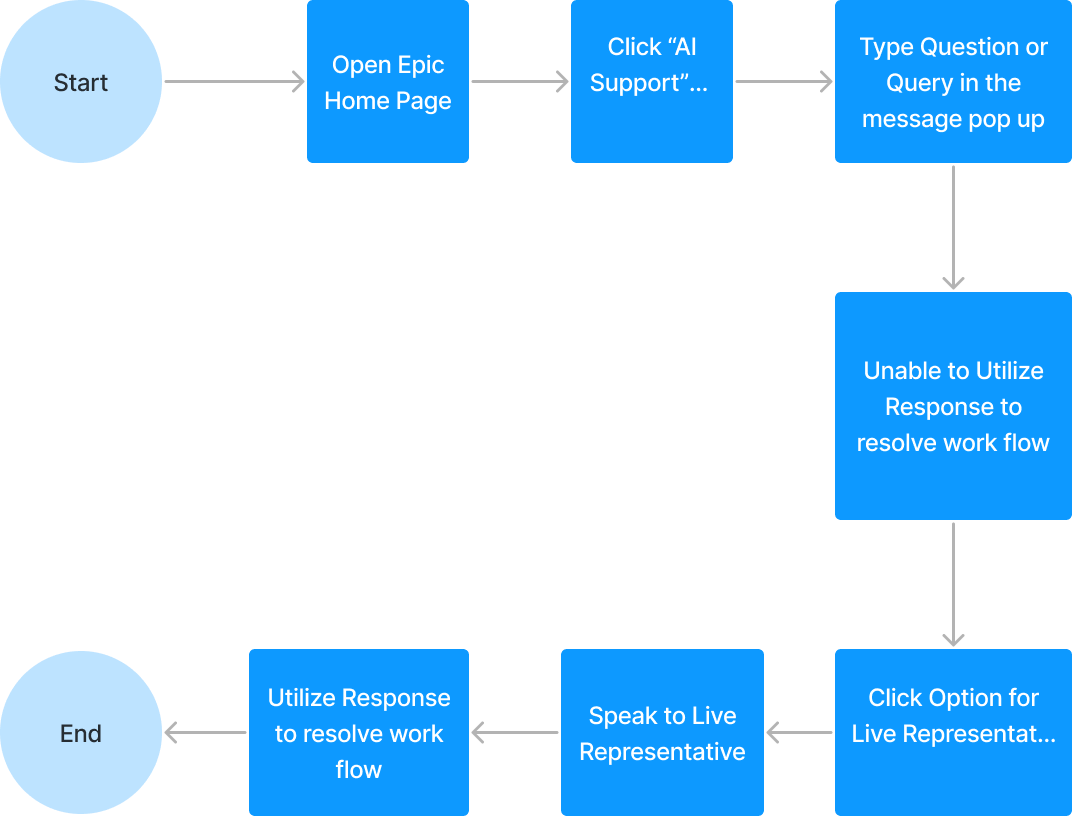
Low to Mid Fidelity Wireframes
The Central Feature: AI Support Flow
Additional Features: Access to a Live Representative
High Fidelity Wireframes
Hi Fi V1 to V2
- Locate & Open the Epic Support Icon.
- Ask the needed question about finding the “Memorandum of Transfer” form and indicate a notion of typing in the frame to speak to the bot.
- Use the Live Rep option to gather more information.
- Utilize the acquired information to locate the “Memorandum of Transfer” form.
Most of the suggestions or possible addendums to the product were not task flow related, or related to the feature interface.
Instead, some healthcare professionals had suggestions regarding the feature’s role in real-world situations.
Female, 40
Angelo Arambulo ⏤ 2025